Piano StarTuber
- 3.5
- Rating
- 500.00K
- Installs
- Free
- Price
 Analysis by App-foxy
I approached Piano StarTuber as a quick music game rather than a replacement for a real piano lesson. Its central appeal is simple: it lets me play familiar-style piano patterns by tapping the screen, turning short sessions into something that feels closer to performing than practicing scales. That distinction matters. I do not need musical training to begin, but I still get a small sense of timing, pressure, and momentum as I try to keep a piece moving.
The game is free, rated for Everyone, and comes from Cuongbeo Game Studio. It sits in the music section of the game market, where it competes less with serious instrument simulators and more with casual rhythm titles. After spending time with it, I think its strongest quality is the low barrier to entry. I can open it when I have only a few minutes, understand the basic interaction quickly, and decide almost immediately whether the pace suits me.
That accessibility is also the reason I would not recommend it to every music fan. Someone looking for sheet music, structured lessons, recording tools, or a realistic keyboard layout will probably want a different kind of app. This is best understood as a touch-based performance game, with the fun coming from following the flow accurately rather than learning how to play a physical instrument.
You May Also Like

 Blood Strike: 2.5 Anniversary
Blood Strike’s Loadouts Turn Every Drop Into a Tactical Gamble
A close look at Blood Strike’s custom loadouts: how fast access to signature weapons reshapes its battle royale rhythm, rewards preparation, and narrows the gap between fights.

 Pandora - Music & Podcasts
Pandora’s Music Is Easy to Start, but Harder to Recover
Pandora’s strength is its low-effort path from a seed to a station. Its weak spot is how much confidence it asks you to place in connection, setup, and quiet recovery.

 8 Ball Pool
 Is Built on Rivalries, Rematches, and Routine
A close look at the rivalries, rematches, shared routines, and unanswered safety questions that turn a quick pool match into a persistent mobile community.

 Samsung Music
’s Quiet Strength Is Playing What You Already Own
Its reach comes less from spectacle than from dependable access to a personal library. That simplicity is both the app’s strongest retention engine and its ceiling.

 AccuWeather: Weather Radar
AccuWeather Review: A Quick, Clear Forecast for Everyday Decisions
For everyday plans, the best forecast is the one you can understand quickly. AccuWeather makes rain timing, radar, and local conditions easy to act on, with a few trade-offs.

 Hill Climb Racing
Why Hill Climb Racing Still Turns Crashes Into One More Run
A tiny car, a bumpy hill and one more upgrade: Hill Climb Racing keeps resurfacing because its simple chaos makes every near-miss feel personal.
More From Our News Desk
View All News


Why the tap-to-play idea works
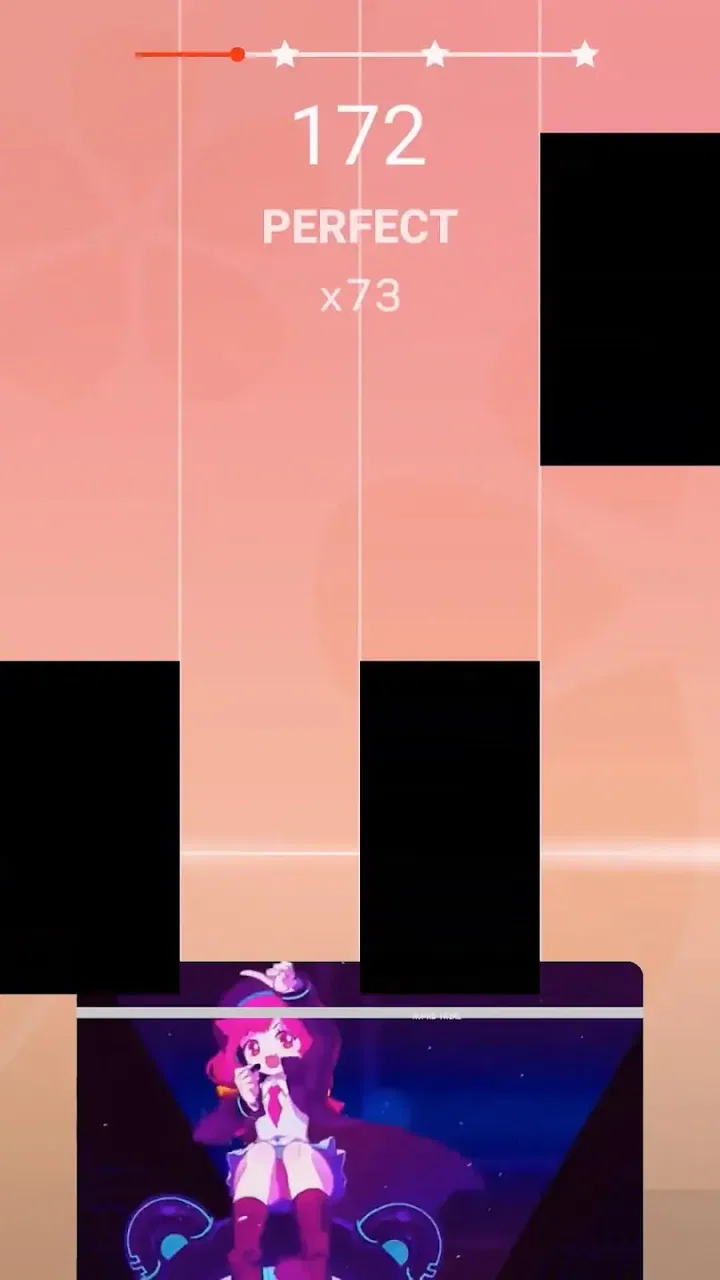
The defining capability is the way the game turns a song into a sequence of visual actions. Instead of asking me to understand notation first, it gives me an immediate task: watch what is approaching, tap at the right moment, and try to maintain the musical line. That makes the experience inviting for a beginner who might feel intimidated by a piano-learning app.
In practice, this changes my attention. I am not thinking about finger positions in the traditional sense. I am watching spacing, speed, and the next decision. When the pattern is comfortable, the game produces a satisfying sense of flow. When the pattern accelerates, the challenge becomes less about knowing music and more about staying calm enough not to tap early.
I found that this capability works particularly well during short breaks. A quick session can feel complete even if I do not spend a long time playing. That is useful on a phone because the game does not demand the same commitment as a lesson or a full rhythm-game campaign. I can play while waiting for an appointment, take a break between tasks, or use it as a small evening distraction without preparing anything.
The important trade-off is that visual simplicity does not mean the game is effortless. The first few attempts may feel easy, but maintaining accuracy becomes more demanding once the sequence stops matching my natural tapping rhythm. I had to resist looking too far ahead. Focusing on the immediate pattern while keeping peripheral attention on what follows gave me better results than trying to memorize the entire screen.
The real strength is not piano realism; it is instant musical participation. I can feel involved in a performance without owning a keyboard or knowing how to read music. For casual players, that is more valuable than a detailed instrument interface that takes longer to learn.
What playing feels like from the first session
The opening experience is approachable because the basic idea is easy to understand without a long explanation. I can begin by following the on-screen movement, and the game communicates success or failure through the immediate result of each tap. That direct feedback makes it clear when I am losing the rhythm, even without a separate tutorial-style lesson.
I recommend starting with a relaxed hand position rather than gripping the phone tightly. It sounds minor, but tension makes quick taps less consistent, especially when I am trying to correct a missed note. I also found it useful to keep the device steady on a table during focused attempts. Holding it in one hand is convenient, yet it makes precision harder when the sequence becomes busy.
Another practical tip is to treat the first attempt as a calibration run. Instead of chasing a perfect result immediately, I watch how quickly the pattern moves and notice whether my finger tends to arrive early or late. On the next run, I can adjust my timing with a clear goal. This turns failure into useful information rather than making each restart feel random.
The game’s music-game identity also means that sound is important to the experience. Playing with audio makes the taps feel more connected to the performance, while silent play is more practical in public places. If I am using it quietly, I pay more attention to the visual timing and accept that some of the atmosphere is lost. That is a normal compromise for a mobile game, but it affects how enjoyable a session feels.
How I would use it in an ordinary day
Imagine I have ten minutes before leaving for work. I do not have enough time for a piano lesson, and I am not looking for a long story game. I can open this, play a short sequence, and stop without needing to remember a complicated objective. If the first attempt goes poorly, I can try again with one specific adjustment: slower taps, steadier posture, or better focus on the next visual cue.
That same routine works as a mental reset. The game gives my attention a narrow target, which can be helpful after a long stretch of reading or scrolling. I am not claiming it teaches formal concentration, but the act of matching taps to a moving rhythm is more active than passively watching a video. It gives a short break a clear beginning and end.
For families, the Everyone rating makes the game easier to consider as a casual shared activity. A parent can hand the phone to a child and understand the basic interaction quickly. Still, I would treat it as entertainment rather than a substitute for guided musical education. A child may enjoy the feeling of playing songs, but that does not automatically build the skills needed for an acoustic or electronic piano.
It can also work as a gentle introduction to rhythm for someone who has never tried a music game. The player does not need to know technical terms to notice that tapping ahead of the cue causes trouble. That immediate relationship between timing and outcome is the most educational element I would attach to it, though it remains informal and game-focused.
Where it differs from piano apps and rhythm games
Compared with a piano-learning app, this game is less demanding at the start and less comprehensive over time. A learning app normally earns its value through lessons, exercises, notation, technique guidance, or a path from beginner concepts to more advanced playing. Piano StarTuber is more appealing when I want the sensation of performing immediately, without turning the session into homework.
Compared with a full keyboard simulator, it is also more forgiving in concept. A simulator tries to reproduce the layout and response of piano keys, while this experience focuses on the timing challenge created by the screen. That makes it easier to play on a small phone, but it also means the finger movements do not transfer directly to a real keyboard.
Against traditional rhythm games, the piano framing gives the taps a more musical identity. The attraction is not simply hitting targets for points; it is maintaining the impression that the piece is continuing through my actions. Players who enjoy visual timing challenges may appreciate that focus, while people who prefer complex stages, deep customization, or competitive systems may find the experience too narrow.
This is why I would choose it for a short, approachable music session, but choose a lesson app for deliberate skill building and a larger rhythm title for a deeper progression system. The alternatives are not necessarily better; they serve different purposes. The mistake would be expecting this game to cover all three roles.
Small habits that make the game more enjoyable
My first useful habit was keeping my eyes slightly ahead of the tap point. Looking only at the exact place where I must touch makes me react late when the sequence speeds up. Watching the incoming movement gives me a fraction more time to prepare. This is a simple adjustment, but it changes the game from frantic reaction into controlled anticipation.
My second habit was separating accuracy practice from score chasing. If I focus on the result too early, I tend to rush and repeat the same mistake. Instead, I use one run to understand the pattern and another to improve consistency. That approach is especially helpful for players who become frustrated by immediate misses.
A third tip is to switch fingers when the layout allows it rather than forcing one finger to handle every tap. I do not treat this as piano technique, because the game is not teaching traditional fingering. It is simply a way to reduce fatigue and keep my tapping comfortable during a longer session.
I also recommend adjusting the surrounding environment before blaming the game. Glare on the screen, an unstable grip, background noise, or a crowded setting can all make timing feel worse. A quiet place and a stable phone position help me judge the visual cues more reliably. These changes cost nothing and often improve the experience more than repeatedly restarting.
The limits I noticed while playing
The biggest limitation is the narrowness of the core loop. The tap-to-play idea is immediately understandable, but its appeal depends heavily on how much I enjoy repeating timing attempts. If I need a sense of discovery, a broad lesson plan, or a long-term achievement structure, the game may feel lightweight after the initial novelty fades.
There is also a difference between feeling like a pianist and becoming one. The game can make a successful sequence feel musical, but it does not teach posture, hand independence, reading, dynamics, or the physical relationship between keys. I would not use a good run here as evidence that I am ready to play the same piece on a real instrument.
Touch controls bring their own friction. A phone screen has no physical key boundaries, so my finger has to rely on sight and habit. On a compact device, crowded moments may feel less comfortable than they would on a tablet. Players with larger hands or limited touch precision should keep that in mind before expecting a completely relaxed experience.
The free price makes experimentation easy, but it also sets an expectation that the game should be judged as a casual download rather than a full music-training package. I can try it without a financial commitment, which is a clear advantage for curious players. At the same time, anyone seeking a polished professional tool should direct that budget and attention toward software built specifically for instruction or instrument simulation.
The public response gives a useful warning against assuming universal appeal. The game holds an average rating of 3.4 from around 611 ratings, so the experience clearly works very well for some people and less well for others. I read that as a sign to keep expectations realistic: the concept is accessible, but personal preference about touch rhythm, song presentation, and repetition will strongly affect enjoyment.
Who benefits most from this particular design
I think the best audience is someone who likes music but does not want a technical lesson every time they open an app. A casual player can get into the action quickly, while a rhythm-game fan may enjoy the challenge of improving timing. It is also a sensible option for someone who wants a family-friendly game that can be understood without specialist knowledge.
It suits short sessions better than marathon play. The game has enough immediate tension to fill a spare moment, but I would not choose it as my only mobile game for a long trip unless I already enjoyed repeating musical patterns. Its value comes from convenience and directness, not from a huge amount of surrounding content.
Beginners who are curious about piano may also gain something from it, as long as they understand the boundary between inspiration and instruction. It can make the idea of following a melody feel less intimidating. If that experience motivates someone to try a real keyboard afterward, the game has done something useful. It should simply be the first step toward curiosity, not the final step in learning.
On the other hand, I would skip it if my priority were formal music education, realistic two-handed practice, recording, composition, or a detailed catalog of instrument controls. I would also look elsewhere if I wanted a competitive rhythm game with a large progression system. Those needs call for different tools, and this particular design is strongest when kept focused.
Device expectations and version context
The game supports Android devices running version 8.0 or later, which covers a broad range of phones still in everyday use. That makes it easier to consider on an older spare device, though the comfort of playing will still depend on screen size, responsiveness, and how securely the phone can be held. A larger display may make visual timing easier, while a smaller phone is more convenient for quick sessions.
The current version is 1.0.24, and the game has passed 500K installs. Those details suggest that it has reached a sizable audience without making it a guarantee of personal enjoyment. I would still judge it by the specific use case: a free music game for accessible tap timing, not a complete piano ecosystem.
Because it is free and suitable for Everyone, the barrier to trying it is low. My advice is to give it a few focused sessions rather than deciding after one distracted attempt. Use headphones or a quiet setting if possible, keep the phone stable, and concentrate on learning the visual rhythm before worrying about perfect results. That gives the central mechanic a fair chance to show whether it matches your habits.
My recommendation after using it
Piano StarTuber succeeds when I treat it as a compact performance game. Its best moment is the instant when a sequence starts to flow and my taps feel connected to the music. That feeling is approachable, repeatable, and well suited to a phone. The developer, Cuongbeo Game Studio, has built the experience around an idea that is easy to understand without removing the need for timing.
It is not the right choice for everyone. The limited focus can become repetitive, touch controls cannot reproduce a physical piano, and the game should not be mistaken for a structured course. Players who need advanced musical tools or a deeper rhythm-game framework will be happier with specialized alternatives.
For me, the deciding question is simple: do I want to play piano in the educational sense, or do I want a quick game that makes me feel involved in a song? If the second answer sounds right, this free music title is worth trying. I would recommend it to casual players, families, and rhythm fans who value immediate access over complexity. I would recommend skipping it when realistic technique, composition, or long-term musical progress matters more than a satisfying few minutes of tapping.
FAQs for Piano StarTuber
01What is Piano StarTuber and what does it offer?
Piano StarTuber is an innovative app designed for music enthusiasts who want to learn and play the piano. It offers a wide range of features including interactive tutorials, a library of popular songs, and a virtual keyboard. The app is suitable for both beginners and advanced players looking to enhance their skills.
02Is Piano StarTuber suitable for beginners?
Absolutely! Piano StarTuber provides step-by-step tutorials and easy-to-follow lessons tailored for beginners. The app's user-friendly interface helps new users learn the basics of piano playing at their own pace, making it accessible and enjoyable for those just starting their musical journey.
03Does Piano StarTuber require an internet connection?
Piano StarTuber primarily functions offline once downloaded, enabling users to practice anywhere without needing a constant internet connection. However, some features like song updates and community interaction may require online access to ensure the latest content is available.
04What devices are compatible with Piano StarTuber?
Piano StarTuber is available for both Android and iOS devices. It is optimized to run smoothly on smartphones and tablets, ensuring a seamless experience across different screen sizes. Users should ensure their device meets the app's minimum system requirements for optimal performance.
05Are there in-app purchases in Piano StarTuber?
Yes, Piano StarTuber offers in-app purchases. While the app provides a range of free content, additional features, premium songs, and advanced tutorials can be unlocked through purchase. This allows users to customize their experience based on their interests and learning goals.
Pros
- User-friendly interface for beginners.
- Wide selection of popular songs.
- Interactive tutorials enhance learning.
- Offline mode available for practice.
- Regular updates with new features.
Cons
- In-app purchases can be pricey.
- Limited free song options.
- Requires internet for full features.
- Some ads interrupt gameplay.
- Graphics could be more engaging.

Piano StarTuber
Gallery